
← All demos
Higher-ed lectern panel · Q-SYS / Crestron / Extron
University Classroom
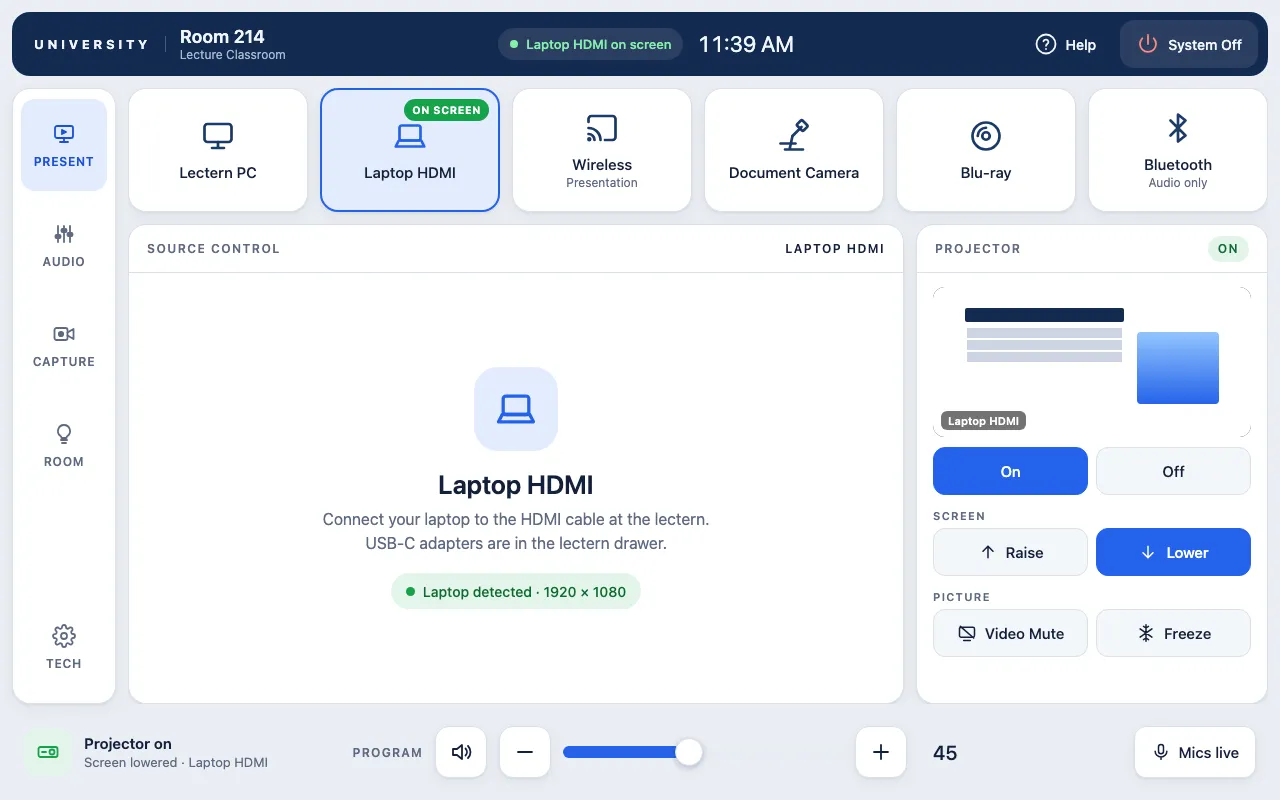
Faculty tap to wake the room and pick a source: lectern PC, laptop, wireless presentation, document camera, Blu-ray or Bluetooth audio. The system starts itself, warms up the projector, lowers the screen and shows what is on screen, with the right controls for each source.
Behind that simple first screen are the tools campuses ask for: microphone mixing with wireless battery levels, lecture capture with privacy mode and auto-publish, lighting scenes, shades, routing to a side display, a one-tap help-desk request and a PIN-protected technician page.
This is a live demo: tap or click any control to try it.
Interactive demos are built for tablets and computers. Open this page on an iPad or desktop to try it.
What it shows
- Tap-to-start with system start-up, projector warm-up and cool-down timers
- Six sources with on-screen feedback and source-specific controls
- Projector, screen, video mute and freeze with a live preview
- Auto or manual mic mixing with wireless battery warnings
- Lecture capture: record, pause, stop, privacy mode, layouts and publish progress
- Lighting scenes, shades and side-display routing
- One-tap AV help request and a PIN-locked tech page